API versioning strategies: URL path, header or query parameter?
For a public or partner API, put the version in the URL path, as in /v2/orders:
consumers expect it, and the version shows up in every log, error report and support ticket.
Use a header when URLs must stay fixed, and avoid a query parameter as the main scheme.
Plan the old version's retirement at the same time.
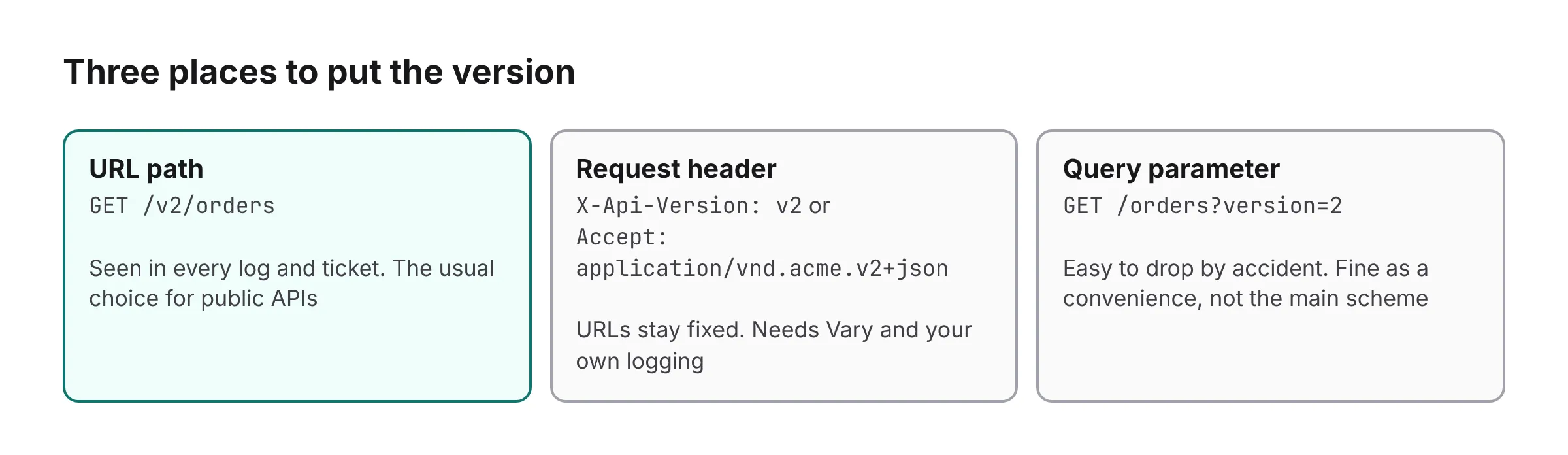
Where can an API version go?
In the URL path, in a request header, or in a query parameter. Here is what each is good at, and what to watch for:
| Where | Example | Good at | Watch out for |
|---|---|---|---|
| URL path | GET /v2/orders |
Visible in every log, link and curl command. Easy to route and cache. | Versions the whole API at once, so a change to one endpoint bumps them all. |
| Custom header | X-Api-Version: v2 |
Keeps URLs stable. Can default to a version when the header is missing. |
Invisible in links and default logs unless you record it. Easy to forget in a client.
Responses must send Vary: X-Api-Version
or a shared cache can serve one version's response to another.
|
| Media type | Accept: application/vnd.acme.v2+json |
Versions the representation, the most HTTP-shaped option. |
The hardest for consumers to get right, and for you to debug. Responses must send Vary: Accept.
|
| Query parameter | GET /orders?version=v2 |
Easy to try from a browser. Works through tools that drop headers. | Mixes versioning with filtering. A CDN that ignores or reorders query strings can serve the wrong version. |
Which versioning scheme should you pick?
For a public or partner API, use the URL path. It is what most consumers expect, and the version shows up everywhere a human looks: logs, error reports, support tickets, screenshots. When a customer writes in about a failing call, you can see which version they called without asking.
Use a header when the URL has to stay fixed (hypermedia links, URLs stored by clients for
years) or when you version individual resources rather than the whole API. If you do,
record the version on every request yourself, because default log formats won't show it,
and send a Vary header naming it so caches keep the versions apart.
Avoid a query parameter as the main scheme. It is fine as a convenience next to one of the others.
Whatever you pick, pick one and say so in your docs. Accepting a version in two places with no stated precedence is how a request ends up served by the version the client did not ask for.
When is a change worth a new version?
Only when a client cannot absorb the change without changing their code. A new version is a promise to run two things at once, possibly for a year, so spend it only on changes like these:
- Removing or renaming a field, or changing its type or meaning.
- Making an optional request field required.
- Changing error codes or status codes clients branch on.
- Changing pagination, authentication or rate-limit behavior.
Adding an optional field, a new endpoint or a new enum value clients are told to tolerate is not a new version. Publish a short compatibility policy that says which changes you make without warning, so clients code defensively against them.
Should versions be numbers or dates?
Either works; what matters is that a client can tell from the version alone whether it is
newer. Numbers (v1, v2) suit APIs that change rarely and in big
steps. Dates (2026-06-01) suit APIs that ship small breaking changes often:
each client is pinned to the date it was built against, and moves forward when it chooses.
Date versions make retirement harder to see, because there can be dozens of them. If you use dates, group them into a supported range ("every version from the last 12 months") so the policy is one sentence, not a table.
How many versions should you run at once?
Two is the usual target: the current version and the one before it. Each extra live version multiplies your test matrix, your documentation and your on-call surface, and every bug fix has to be checked against each. A third version is sometimes worth it for a short overlap while a large customer migrates, but put an end date on it when you start it.
If you find yourself running four or five, the problem is usually not the scheme. It is that nobody can say who still uses the old ones, so nobody dares turn them off.
When should you plan the old version's retirement?
At the same time you plan the new version.
The scheme decides how a client asks for v2. It says nothing about when
v1
stops, who still uses it, or how they find out. That is where versioning
usually goes wrong: old versions pile up because nobody can say who would break if one were
turned off.
Three habits make the eventual retirement routine:
-
Record the version on every request, with the identity of the client that sent it. Then
"who still calls
v1" is a query. The guide to finding clients on an old version shows how. - Announce deprecation in the response itself, with Deprecation and Sunset headers, so it reaches the engineers making the calls and not just the inbox you emailed.
- Decide what a retired version returns before you retire it: 410 Gone, not 404.
Sources
- Google AIP-185: API versioning, which puts the major version in the URL path.
-
RFC 9110 on the
Varyheader, needed when the version is in a request header. - MDN: Accept, the header media-type versioning uses.
- Semantic Versioning 2.0.0, on which changes need a new major version.
Where EndPointBlank fits
EndPointBlank's client libraries for Ruby, Python, JavaScript, Java and Elixir read the
version from any of these schemes: a /v2/
path segment, an X-Api-Version
header, a vendor media type in Accept
or Content-Type, or a version
query parameter, and each lets you supply your own lookup instead. Every authorization
records that version with the calling client, so the list of clients on an old version is
always one screen away.
See how version lifecycle works or start free. When it is time to retire one, read how to deprecate an API version.