How to deprecate an API version without breaking your customers
To deprecate an API version without breaking customers, list every client still calling it,
publish a deprecation policy, announce the date with Deprecation
and Sunset
headers on every response, give each client a specific migration path, remind them 30, 7
and 1 day before the date, and check usage again that morning before you retire it.
Every API team eventually has to turn off v1. The code is the easy part. The
hard part is the question nobody can answer with confidence: who breaks when we do?
Most teams answer it by announcing a date, waiting, and hoping. The version's status lives in a changelog, the usage data lives in a monitoring tool, and nothing joins the two. So the retirement slips, the old version keeps running for years, and every breaking change after it costs more.
Here is the process that works, whether or not you use a tool for it.
1. Who is still calling the old version?
Find out by client, not by traffic share: you need a list of the clients still calling the old version, with how often and when each last did. "v1 still gets 4% of requests" is not actionable. "Three clients still call v1, and one of them is your largest customer" is. If your gateway or logs cannot answer this by client identity, fix that first: everything else depends on it. How to find which clients still call an old API version walks through it.
Look back at least 90 days before you trust the list. Monthly invoicing jobs, quarterly reports and year-end exports call an API rarely, and they are the integrations most likely to be forgotten by the people who own them.
2. What should a deprecation policy say?
A deprecation policy says how much notice consumers get, what a deprecated version still receives, and who can grant an exception. Write those three answers down before the first announcement, or start from our API deprecation policy template:
- How much notice consumers get before a version is retired.
- What support a deprecated version still receives: security fixes only, or nothing.
- Who can grant an exception, and for how long.
Publish it where consumers will find it before they need it: in the API docs, linked from your terms, and in the email that issues a new set of credentials.
How much notice should you give?
For an API other companies build on, six to twelve months between the announcement and the retirement date is a common range; for internal services, one or two release cycles is often enough. The right number is the time your slowest important client needs to plan, build, test and ship a change, plus a margin for the month they are busy with something else.
- Mobile apps need the longest window, because old installs keep calling after a release until their users update.
- Regulated customers such as banks and healthcare providers often have change-approval processes measured in months, not sprints.
- A security problem can justify a shorter window. Say so in the policy, so a short notice is the exception you promised rather than a surprise.
3. How do consumers find out from the API itself?
Two standard response headers tell them on every call. The Deprecation
header (RFC 9745) says when the endpoint was, or will be, deprecated, and the
Sunset
header (RFC 8594) says when it will stop working:
HTTP/1.1 200 OK
Deprecation: @1798761600
Sunset: Wed, 30 Jun 2027 00:00:00 GMT
Link: <https://api.example.com/docs/migrate-to-v2>; rel="deprecation"
Client libraries and monitoring can read these. Emails get lost when the engineer who built the integration has moved on; a header reaches whoever is running the code today. Deprecation and Sunset headers: a practical guide has the exact syntax and code for five frameworks.
4. What does a good migration path look like?
For each client still on the old version, know which endpoints they call and what replaces
each one. A generic "please upgrade to v2" loses to a specific "your two calls to
/v1/charges
map to /v2/payments
like this".
A useful migration note fits on one screen: the old call, the new call, the fields that were renamed or removed, and one example request and response for each. If a change has no direct replacement, say what the client should do instead, and offer a call with the team that owns the new version.
5. When should you remind people of the date?
A date nobody is reminded about is a date nobody remembers. Reminders a month, a week and a day before the date, sent to the people who actually own the integration, catch most stragglers. The deprecation email templates cover each one.
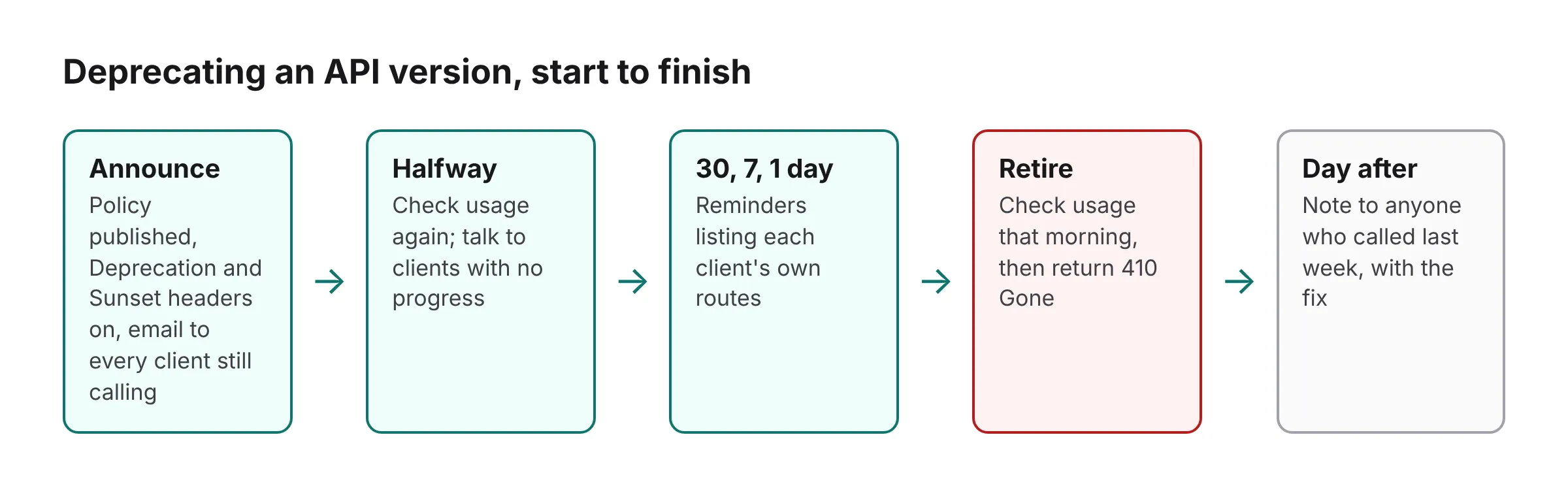
| When | What happens |
|---|---|
| Announcement |
Policy published, Deprecation
and Sunset
headers on, first email to every client still calling.
|
| Halfway | Usage checked again; clients with no progress get a direct conversation. |
| 30, 7 and 1 day out | Reminders to the clients still calling, each with their own routes listed. |
| Retirement day | Usage checked one last time, then the version returns 410 Gone. |
| The day after | A short note to anyone who called in the last week, with the fix. |
6. What if a client is still calling on the day?
Decide deliberately: extend the date for that client, or go ahead knowing exactly who breaks. Either is fine. Finding out from a support ticket is not. Check usage again on the morning of the retirement, not the week before, because a client that moved can move back after a rollback on their side.
If you extend, extend for the one client that asked, with a new date in writing, rather than for everyone. A blanket extension tells every other client the date was never real, and the next retirement takes longer.
7. What should the old version return after retirement?
Return 410 Gone
with a link to the migration guide, rather than a generic 404. The last
straggler should be able to fix their integration from the error alone.
410 Gone vs 404
explains why, with code.
Before you flip the switch, the deprecation checklist walks through the evidence, owners and cutover controls to have in place.
Common mistakes
- Announcing before you know who is affected. You cannot write a specific migration note, or know who to remind, without the list from step 1.
- Deprecating and changing behavior at once. A deprecated version should keep working exactly as before until it is retired. Changing it on the way out breaks clients twice.
- Sending every reminder to one shared inbox. Reminders work when they reach the person who owns the integration today.
- Leaving the version running "just in case". An old version kept alive past its date still needs patches, monitoring and on-call attention, and it teaches clients that dates move.
Sources
-
RFC 9745, the
DeprecationHTTP response header (IETF, 2025). -
RFC 8594, the
SunsetHTTP header (IETF, 2019). - IANA HTTP Field Name Registry, where both headers are registered.
- MDN: 410 Gone, the status a retired version should return.
Where EndPointBlank fits
EndPointBlank keeps each endpoint version's lifecycle state next to the record of which clients still call it, so step 1 is a list rather than a log search. Mark a version deprecated in the portal and consumers are told, with no deploy. Attach a date and the version reads Retires in 30 days to you and to every consumer, with reminders 30, 7 and 1 day out. When the version leaves production, having been deprecated first, it is retired automatically.